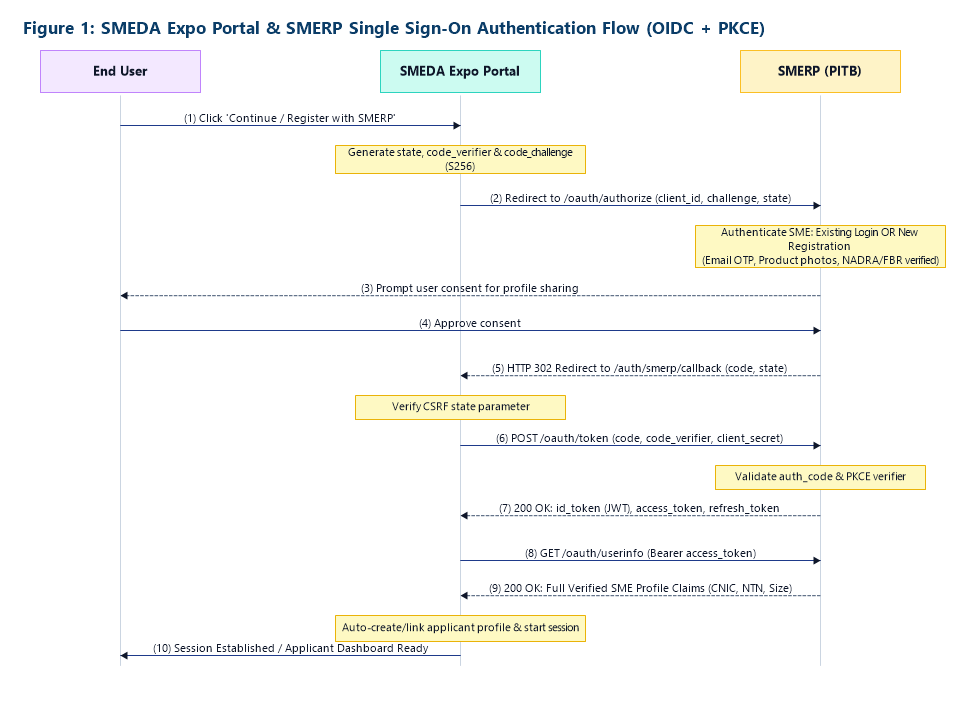
Figure 1: SMEDA Expo Portal & SMERP Single Sign-On Authentication Flow (OIDC + PKCE)
The SMEDA Expo Management Portal (hosted at https://projects.smeda.org/EXPO_PORTAL/) is the official national digital platform through which Small and Medium Enterprises (SMEs) across Pakistan apply for participation, exhibition space, and targeted subsidies in National and Regional SME Expos (including the flagship National SME Expo 2027 – NSE2027).
To eliminate duplicate registrations, prevent password fatigue, and leverage verified government master records, SMEDA is integrating the Expo Management Portal with SMERP (SME Registration Portal), developed and managed by the Punjab Information Technology Board (PITB).
This specification establishes a robust, decoupled, and future-proof identity handshake:
/oauth/userinfo endpoint. This eliminates the need for separate standalone verification APIs and ensures long-term operational stability.| Aspect | Architectural Choice | Technical Rationale |
|---|---|---|
| Protocol | OAuth 2.0 + OpenID Connect (OIDC) | Industry-standard, decoupled federated identity and claim sharing protocol. |
| Grant Type | Authorization Code Flow + PKCE (S256) | Complies with RFC 7636; prevents code interception attacks and eliminates client secret exposure in front-channel calls. |
| Token Format | Signed JWT (JSON Web Tokens) | Cryptographically verifiable, tamper-proof, stateless tokens carrying authenticated subject metadata. |
| Session Handling | Server-Side Session with Hardened Cookie | HTTP-only, Secure, SameSite cookies with strict domain binding and idle expiration. |
| Token Lifetimes | Access Token: 60 mins Refresh Token: 30 days |
Balances minimal token exposure against seamless session renewal for long multi-step expo forms. |
The diagram below outlines the full lifecycle: from SME authentication on SMERP to claim exchange and automatic account provisioning on the SMEDA Expo Portal.
Step-by-Step Flow:
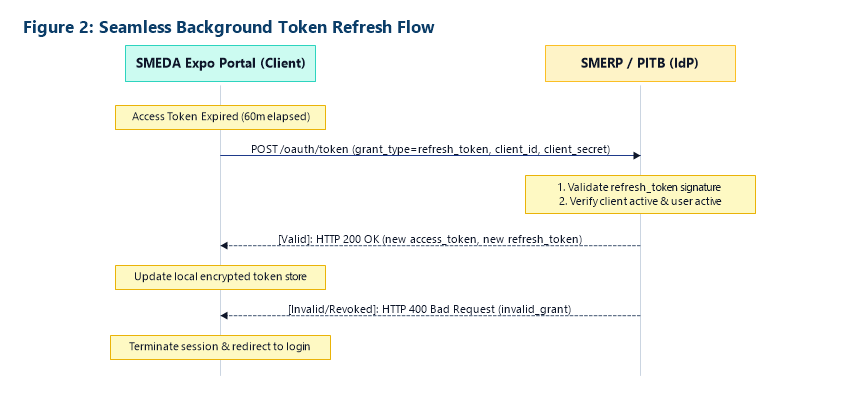
code_verifier, hashes it to code_challenge (S256), generates a state token, and redirects to SMERP /oauth/authorize.https://projects.smeda.org/EXPO_PORTAL/auth/smerp/callback with the authorization code and state.state and makes a server-to-server POST to /oauth/token passing the code and code_verifier./oauth/userinfo, consumes the pre-verified SME profile, auto-provisions or links the applicant account, and establishes an active portal session.To ensure applicants are never logged out or lose entered data while completing extensive expo forms, the Expo Portal transparently refreshes expired access tokens in the background:
| Endpoint Category | Endpoint Path | HTTP Method | Function & Technical Purpose |
|---|---|---|---|
| Metadata Discovery | /.well-known/openid-configuration |
GET |
Automated discovery of authorization, token, userinfo, and JWKS endpoints. |
| Authentication | /oauth/authorize |
GET |
Renders SMERP login/registration interface and prompts for user consent. |
| Token Grant | /oauth/token |
POST |
Exchanges authorization code (with PKCE) or refresh token for JWTs. |
| Identity Claims | /oauth/userinfo |
GET |
Returns authenticated SME personal, business, and pre-verified KYC claims. |
| Cryptography (JWKS) | /.well-known/jwks |
GET |
Exposes public keys for validating the cryptographic signature of ID Tokens. |
| Session & Revocation | /oauth/logout & /oauth/revoke |
POST |
Invalidates active sessions and revokes compromised tokens. |
/oauth/userinfo response means PITB only maintains one standard endpoint, and SMEDA only queries one payload. Neither team will face breaking changes or maintenance hurdles in the future.Standard /oauth/userinfo Payload Specification:
The table below defines how each field from the SMERP Registration Form is consumed and mapped into the SMEDA Expo Management Portal database upon successful authentication:
| SMERP Form Field | Data Type | Mandatory | SMEDA Expo Portal Field Mapping | Operational Usage in Expo Portal |
|---|---|---|---|---|
| Email Address | String (Email) | Yes | users.email |
Primary applicant account identity and official correspondence. |
| First & Last Name | String | Yes | applications.data['contact_person_name'] |
Authorized enterprise representative for expo communications. |
| Mobile No | String (Phone) | Yes | applications.data['mobile_number'] |
SMS notifications and booth allotment updates. |
| Gender | Enum | Yes | applications.data['gender'] |
Women-owned enterprise tracking and demographic reporting. |
| CNIC No | String (13 digits) | Yes | applications.principal_cnic_hash |
Blind-indexed deduplication and NADRA verification anchor. |
| Business Name | String | Yes | applications.data['enterprise_name'] |
Official enterprise name displayed on catalogue, fascia, and badge. |
| Date of Establishment | Date / Year | Yes | applications.data['year_established'] |
Business maturity assessment. |
| Business Address | Text | Yes | applications.data['business_address'] |
Physical business address. |
| Province / State | Dropdown | Yes | applications.data['business_province'] |
Provincial quota allocation and regional eligibility check. |
| District | Dropdown | Yes | applications.data['business_district'] |
District-level eligibility & travel subsidy entitlement calculations. |
| Business Category & Sector | Dropdown | Yes | applications.data['cluster_category'] |
Matching against Event Cluster / Priority Sectors. |
| Deals In (Products / Services) | Radio | Yes | applications.data['deals_in'] |
Automatic Pure Trader screening (Build 2A.1 eligibility guard). |
| Registered with FBR? / NTN | Boolean / String | Conditional | applications.ntn_normalized |
Active Taxpayer List (ATL) verification. |
| Business Size | Dropdown | Yes | applications.data['enterprise_size'] |
Micro, Small, or Medium classification for subsidized stall fee rates. |
PITB is requested to configure and whitelist the following client application profile:
| Client Application Name | SMEDA Expo Management Portal |
| Application Type | Confidential Web Application |
| OAuth Grant Types | authorization_code, refresh_token |
| Code Challenge Method | S256 (Proof Key for Code Exchange) |
| Production Server Base URL | https://projects.smeda.org/EXPO_PORTAL/ |
| Production Callback / Redirect URI | https://projects.smeda.org/EXPO_PORTAL/auth/smerp/callback |
| Production Post-Logout Redirect URI | https://projects.smeda.org/EXPO_PORTAL/login |
| Local Development Callback URI | http://localhost:8080/auth/smerp/callback |
| Local Development Post-Logout URI | http://localhost:8080/login |
| Requested Scopes | openid profile email cnic business_profile tax_profile |